creating a new playlist
-
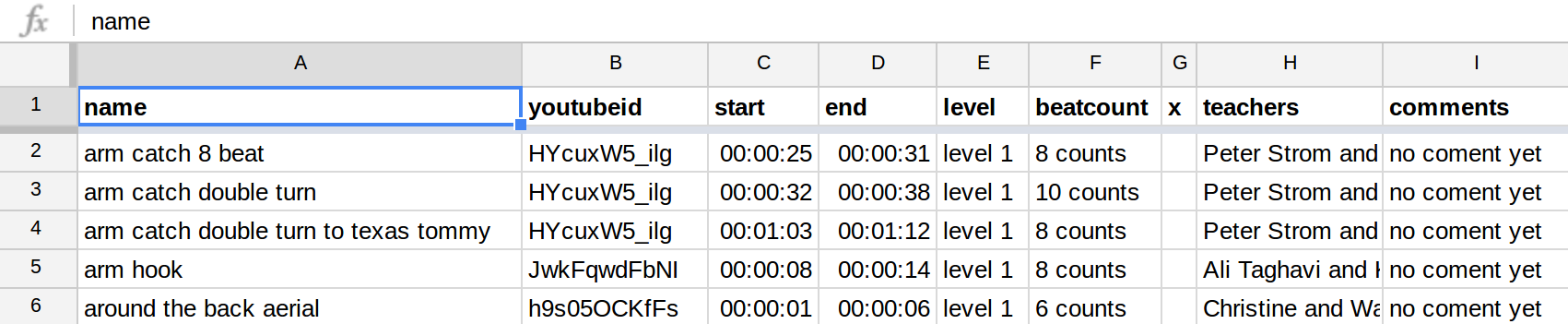
you need first to create a spreadsheet on google doc similar to the one shown below or here , with at least the four following colums
name | youtubeid | start | end. You can add other columns that we displayed on the table. You can add an empty column with the name "x", all the columns that are on the right of that column will
will not be displayed in the table but used to display information below the video (for exemple you can use it to add comments, video authors etc)
(put the columns names in the first row or it will not work):
-
then you need to publish the sheet (File -> Publish to the web -> Publish) for the data to be accessible from our website.
-
then you change sharing permissions of the Google Spreadsheet that should be either “Public” or set to “Anyone with link can view” for our website to be able to fetch cells from the Google Spreadsheet without authentication.
-
then you get the id number of your spreadsheet from its url , for example if the url of your google sreadsheet is
https://docs.google.com/spreadsheets/d/lj1KJ34dfl8kj9gf6jh9k7hjg7kjh7 (do not try this url, this speadsheet does not exist it is juste an example !)
then the id number is lj1KJ34dfl8kj9gf6jh9k7hjg7kjh7
-
finaly you can access to the player with your custom playlist by replacing YOUR_GOOGLEDOC_SPEADSHEET_ID by the id number in this url
http://martingithub.github.io/dance_moves/?source=google_spreadsheet&id=YOUR_GOOGLEDOC_SPEADSHEET_ID